
QuickBooks Error 3371 is a common licensing error that usually appears when you try to open QuickBooks Desktop or activate it after installation. This issue prevents QuickBooks from loading properly and can block access to your company file, which makes it especially frustrating for day-to-day accounting work.
The good news is that Error 3371 is well-understood and can be fixed by following a few structured steps. This guide explains what the error means, why it occurs, and how you can resolve it without risking your data.
What Is QuickBooks Error 3371?
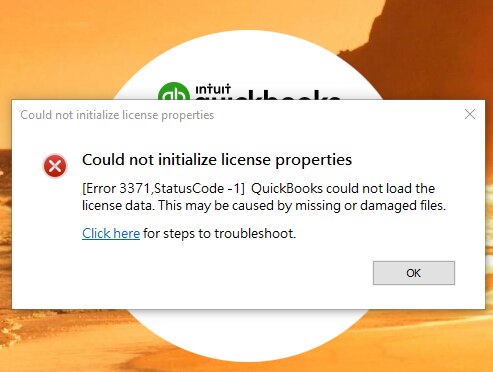
QuickBooks Error 3371 typically appears with a message stating that QuickBooks could not load the license data or required files to initialize the application. In most cases, the problem is linked to damaged or missing entitlement files that store your license and registration details.
This error often shows up:
• After reinstalling QuickBooks
• After a Windows update
• When moving QuickBooks to a new system
• If system files required by QuickBooks are damaged
Causes of QuickBooks Error 3371
QuickBooks Error 3371 may occur due to one or more of the following reasons:
- Damaged or missing EntitlementDataStore.ecml file
- Incomplete or corrupted QuickBooks installation
- Outdated Windows operating system
- Damaged Microsoft MSXML components
- Interference from antivirus or system security settings
- Incorrect system date and time settings
Understanding the cause helps you apply the right fix instead of reinstalling everything unnecessarily.
Common Symptoms of Error 3371
When this error occurs, you may notice:
- QuickBooks fails to open or activate
- License or registration error messages appear repeatedly
- QuickBooks closes immediately after launch
- Inability to access the company file
- System slowdown during QuickBooks startup
How to Fix QuickBooks Error 3371
Follow the solutions below in the given order for best results.
Delete the Entitlement File
The entitlement file stores QuickBooks license information. If it becomes corrupted, QuickBooks cannot verify your license.
Close QuickBooks completely
Press Windows + R and open the Run window
Navigate to
C:\ProgramData\Intuit\Entitlement Client
Open the folder that matches your version
Delete the file named EntitlementDataStore.ecml
Restart your system and reopen QuickBooks
QuickBooks will automatically recreate the file.
Update Windows to the Latest Version
Outdated Windows components can block QuickBooks licensing services.
Open Windows Settings
Go to Windows Update
Install all pending updates
Restart the system
Repair Microsoft MSXML Components
QuickBooks depends on MSXML files to run properly.
Open Command Prompt as administrator
Register MSXML files by running system repair commands
Restart the computer after completion
This step resolves most system-level conflicts related to Error 3371.
Use the QuickBooks Tool Hub
The Tool Hub includes built-in utilities to fix licensing and installation issues.
Download and install the latest QuickBooks Tool Hub
Open the tool and select Installation Issues
Run the QuickBooks Install Diagnostic Tool
Restart the system when the process finishes
Check System Date and Time Settings
Incorrect date and time can prevent license validation.
Right-click the system clock
Select Adjust date and time
Enable automatic date and time settings
Restart QuickBooks
Temporarily Disable Antivirus Software
Some security programs block QuickBooks licensing services.
Temporarily disable antivirus protection
Open QuickBooks and check activation
If resolved, add QuickBooks to antivirus exclusions
How to Prevent QuickBooks Error 3371 in the Future
To avoid running into this error again:
- Always install QuickBooks using administrator rights
- Keep Windows and QuickBooks updated
- Avoid force-closing QuickBooks during activation
- Use reliable antivirus settings with proper exclusions
- Back up license information before system changes
Conclusion
QuickBooks Error 3371 is a licensing-related issue that mainly occurs due to damaged entitlement files, outdated system components, or installation conflicts. While the error may look serious at first, it is usually straightforward to fix by repairing system files and refreshing QuickBooks license data.
Following the steps above should help restore QuickBooks access and prevent the error from returning.
Frequently Asked Questions
Does QuickBooks Error 3371 delete company data?
No, this error affects license validation only. Company files remain safe.
Can Error 3371 occur after reinstalling Windows?
Yes, reinstalling Windows can remove or damage QuickBooks licensing files, triggering this error.
Is reinstalling QuickBooks always required?
Not always. In many cases, deleting the entitlement file or repairing system components resolves the issue.
Related QuickBooks Errors You Should Know About
While fixing QuickBooks Error 3371, you may come across other related QuickBooks issues that affect licensing, payroll, or multi-user connectivity. Understanding these errors can help you troubleshoot faster and avoid repeated disruptions.
QuickBooks Error 6190 and 816
If you experience problems opening a company file in a multi-user environment, QuickBooks Error 6190 and 816 may be the cause. This error usually occurs due to mismatched transaction log files or when multiple users attempt to access the same company file incorrectly.
Fix QuickBooks Error 6190 and 816 when opening company file