
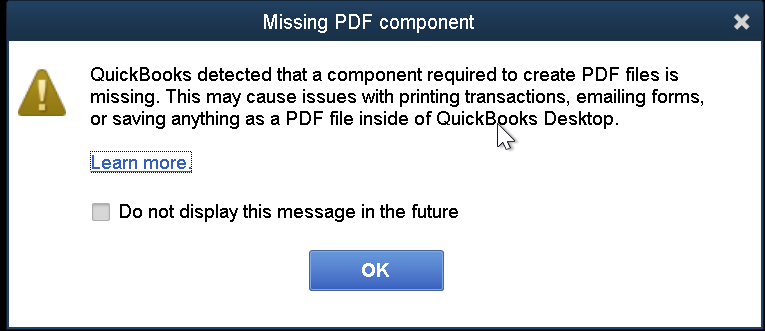
If you rely on QuickBooks Desktop to email invoices, save reports, or print forms, PDF functionality is critical. When QuickBooks suddenly displays the message “QuickBooks detected that a component required to create PDF”, it can interrupt daily accounting work and slow down operations.
This issue usually appears when QuickBooks cannot communicate properly with Windows PDF-related components. The good news is that the error is common and, in most cases, fixable with the right steps.
In this guide, you’ll learn why this error occurs, how it affects your workflow, and the most effective ways to resolve it permanently.
What Does This QuickBooks PDF Error Mean?
QuickBooks uses internal PDF components and Windows services to convert invoices, reports, and forms into PDF files. When one or more of these components are damaged, missing, or blocked, QuickBooks cannot generate PDFs and triggers this error.
You may notice problems such as:
- Invoices not saving as PDF
- Reports failing to email
- Print commands freezing or doing nothing
- Sudden crashes when exporting files
Common Reasons Behind the PDF Component Error in QuickBooks
This error is usually linked to system-level issues rather than your company file. Some of the most common causes include:
- Damaged or disabled Microsoft XPS Document Writer
- Corrupted QuickBooks PDF converter files
- Outdated or incomplete QuickBooks installation
- Windows user permission restrictions
- Antivirus or firewall interference
- Missing Windows updates
Understanding the root cause helps you apply the correct fix instead of trying random solutions.
How to Fix “QuickBooks Detected That a Component Required to Create PDF”
Check the Microsoft XPS Document Writer
QuickBooks relies on Microsoft XPS to create PDF files. If this feature is disabled, PDF creation will fail.
Ensure Microsoft XPS Document Writer is enabled in Windows features. If it’s missing, reinstall it from Windows optional features and restart your system.
Restart the Print Spooler Service
The Windows Print Spooler manages print and PDF tasks. If it’s stuck or stopped, QuickBooks cannot create PDFs.
Restarting the Print Spooler service often restores PDF functionality instantly.
Run QuickBooks Tool Hub – PDF & Print Repair
QuickBooks Tool Hub includes a built-in PDF and Print Repair tool designed specifically for this issue.
This tool automatically repairs damaged PDF components, resets print services, and fixes common configuration problems without manual intervention.
Update QuickBooks Desktop
Outdated QuickBooks versions may contain bugs that affect PDF generation.
Install the latest QuickBooks updates to ensure compatibility with Windows and PDF services.
Repair QuickBooks Desktop Installation
If core program files are damaged, repairing QuickBooks can restore missing or corrupted PDF components without affecting your data.
A repair reinstall is safer than a full reinstall and often resolves the issue quickly.
Check User Permissions
Limited Windows permissions can block QuickBooks from accessing PDF-related system files.
Make sure you’re logged in as a Windows administrator and running QuickBooks with proper privileges.
Temporarily Disable Antivirus or Firewall
Security software may block QuickBooks from creating PDF files.
Temporarily disable antivirus protection and test PDF creation. If this resolves the issue, add QuickBooks as an exception in your security software.
Recreate the PDF Converter
In some cases, QuickBooks’ internal PDF converter needs to be reset or recreated.
This step refreshes PDF drivers and ensures QuickBooks can communicate correctly with Windows printing services.
How to Prevent PDF Errors in QuickBooks in the Future
To reduce the chances of encountering this issue again:
- Keep QuickBooks and Windows updated
- Avoid force-closing QuickBooks during print or email tasks
- Regularly restart your system to clear print service conflicts
- Use trusted antivirus software with proper exclusions
- Perform routine system maintenance and disk checks
The error “QuickBooks detected that a component required to create PDF” can be frustrating, especially when it disrupts invoicing or reporting. Fortunately, it’s usually caused by fixable system-level issues rather than serious data problems.
By following the steps outlined above and maintaining regular system updates, you can restore PDF functionality and prevent the issue from returning
Frequently Asked Questions (FAQ)
Why can’t QuickBooks create PDF files?
QuickBooks cannot create PDFs when Windows PDF components, such as Microsoft XPS or print services, are damaged, disabled, or blocked by security software.
Is this error related to my company file?
No. This issue is system-related and does not indicate damage to your QuickBooks company file.
Does reinstalling QuickBooks delete my data?
A repair reinstall does not delete company files. However, it’s always recommended to back up your data before making system changes.
Can Windows updates cause this PDF error?
Yes. Incomplete or failed Windows updates can disable PDF-related features, triggering this error in QuickBooks.
Does this issue affect QuickBooks Online?
No. This error is specific to QuickBooks Desktop because it relies on Windows-based PDF components.