
QuickBooks is a widely used accounting software that helps businesses manage bookkeeping, payroll, invoicing, and financial reporting efficiently. However, like any desktop application, QuickBooks can sometimes encounter technical issues. One such issue is QuickBooks Error 88888, which may interrupt your workflow and cause unexpected system behavior.
This guide explains what QuickBooks Error 88888 is, why it occurs, how to identify it, and the most effective ways to fix it.
What Is QuickBooks Error 88888?
QuickBooks Error 88888 is a general application error that usually appears when the software fails to process a task properly. It commonly occurs while opening a company file, updating QuickBooks, or performing data-intensive operations. In most cases, the error points to internal program conflicts, damaged files, or system-level issues.
Causes of QuickBooks Error 88888
QuickBooks Error 88888 can occur due to several underlying reasons, including:
- Damaged or incomplete QuickBooks installation
- Corrupted or inconsistent company file
- Issues with the Windows operating system
- Network connectivity problems in multi-user environments
- Incorrect, missing, or outdated QuickBooks components
Understanding the root cause helps in applying the correct fix without unnecessary steps.
Signs of QuickBooks Error 88888
When this error occurs, you may notice one or more of the following symptoms:
- QuickBooks freezes or becomes unresponsive
- The computer crashes or restarts unexpectedly
- Error messages such as “Error 88888: An unexpected error occurred”
- QuickBooks runs very slowly while performing tasks
- Inability to open or access specific company files
These signs usually indicate a deeper issue with the program or system configuration.
Troubleshooting Methods to Resolve QuickBooks Error 88888
Follow the solutions below in order to safely resolve the error.
1. Update QuickBooks to the Latest Version
Running an outdated version can cause internal conflicts.
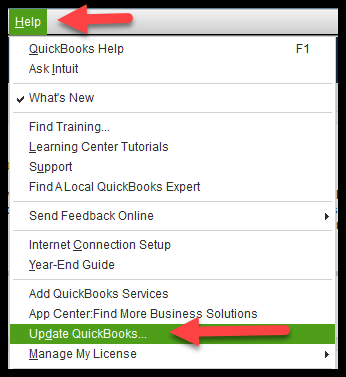
Open QuickBooks and go to the Help menu
Select Update QuickBooks Desktop
Click Update Now and install available updates
Restart QuickBooks after the update completes
2. Repair the QuickBooks Installation
Repairing QuickBooks fixes missing or damaged program files.
Press Windows + R and type appwiz.cpl
Locate QuickBooks in the installed programs list
Right-click and select Repair
Follow on-screen instructions and restart the system
3. Verify and Rebuild the Company Data File
Data corruption is a common trigger for this error.
Open QuickBooks and go to File → Utilities
Select Verify Data and allow the scan to complete
If errors are found, choose Rebuild Data
Create a backup when prompted and complete the rebuild
4. Temporarily Disable Antivirus and Firewall
Security software can block QuickBooks processes.
Temporarily disable antivirus and firewall protection
Open QuickBooks and check if the error persists
If resolved, add QuickBooks as an exception
5. Run the QuickBooks Install Diagnostic Tool
This tool automatically fixes installation-related issues.
Download and install the QuickBooks Tool Hub
Open Tool Hub and select Installation Issues
Run the QuickBooks Install Diagnostic Tool
Restart the computer after completion
6. Create a New Windows User Account
A corrupted Windows user profile can affect QuickBooks.
Open Windows Settings and go to Accounts
Create a new local user with administrator rights
Sign in using the new account
Launch QuickBooks and test functionality
How to Prevent QuickBooks Error 88888
To reduce the chances of this error happening again:
- Keep QuickBooks Desktop updated
- Perform regular company file backups
- Avoid force-closing QuickBooks during operations
- Exclude QuickBooks from antivirus scanning
- Verify company data periodically
Conclusion
QuickBooks Error 88888 can be disruptive, but it is usually manageable with the right troubleshooting steps. The error often stems from installation damage, corrupted company files, system conflicts, or outdated components. By applying the solutions outlined above, most users can restore QuickBooks to normal working condition without data loss.
Maintaining updated software and healthy system practices plays a key role in preventing this issue from recurring.
Frequently Asked Questions
Can QuickBooks Error 88888 be resolved without professional help?
Yes, in most cases the error can be fixed by updating QuickBooks, repairing the installation, or rebuilding the company file.
Does reinstalling QuickBooks delete company data?
No, reinstalling or repairing QuickBooks does not delete company files. However, creating a backup beforehand is strongly recommended.
Is QuickBooks Error 88888 related to Windows issues?
Yes, corrupted Windows system files or user profiles can contribute to this error, especially if QuickBooks works under a different user account.